How to Connect Your Encoder to Switchboard via SRT Input
Whether you're broadcasting a city council meeting, covering a breaking news event, or streaming a high-stakes community event on location, your connection between the camera and the platform needs to be rock-solid. SRT (Secure Reliable Transport) is now a native input option in Switchboard Live, joining RTMP and RTMPS as a first-class choice for your live streaming workflows. Built for maximum reliability over unpredictable internet networks, SRT gives professional encoders a secure, ultra-low-latency path into your Switchboard account, whether you're hardwired in a chamber or working off cellular in the field. This guide will show you how to verify your workflow, find your SRT credentials, and securely connect your livestreaming software.
Written By Rebecca E.
Last updated 3 months ago
Phase 1: Verify Your Switchboard Workflow
Before you can find your SRT information, you must ensure your Switchboard account is utilizing the SBL Ingest, our proprietary streaming network built specifically for maximum reliability and advanced protocols.
Log in to Switchboard and navigate to your Workflow page.
Look at the Server Ingest URL located at the top of the page.
If your URL contains ingest.sb.zone, your workflow is already fully equipped to support SRT! You can move on to Phase 2.
🛑 Don't see ingest.sb.zone?
If your URL looks different, your account is currently routed through an alternative ingest provider. To unlock the SRT feature, you will need to update your workflow to SBL Ingest. Please follow the quick steps in the guide "How to change your source provider" before continuing.
Phase 2: Find Your SRT Input Information
Once you have verified your workflow, finding your SRT link is incredibly easy.
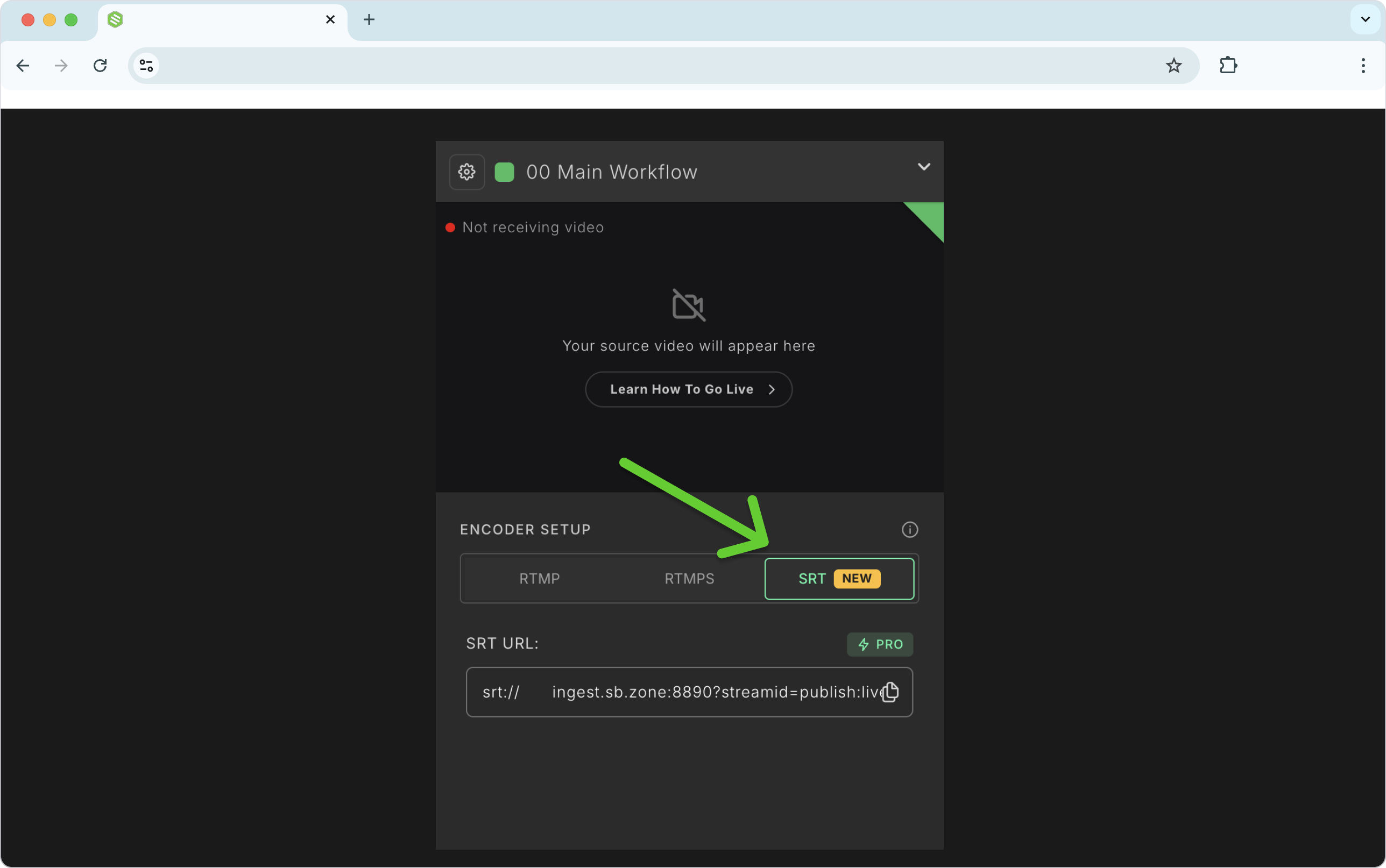
On your Workflow page, look directly below the Switchboard preview monitor.
You will see an Encoder Setup section with three tabs: RTMP, RTMPS, and SRT.
Click the SRT tab.
Copy the SRT URL provided. You will need to paste this into your streaming software in the next phase.
💡 Hardware Encoder Pro Tip (Caller vs. Listener):
If you are using advanced broadcast hardware, your device may prompt you to select a connection mode. Switchboard acts as the "Listener." Therefore, you must set your hardware encoder to "Caller" mode so it can successfully dial out to the Switchboard server.
Phase 3: Connect Your Encoder via SRT.
Each source encoder has specific steps for connecting via SRT. In this example, we will show you how to connect using OBS Studio. (Note: This assumes you have already configured your OBS settings. If not, check out our guide: How to Configure OBS with Switchboard.
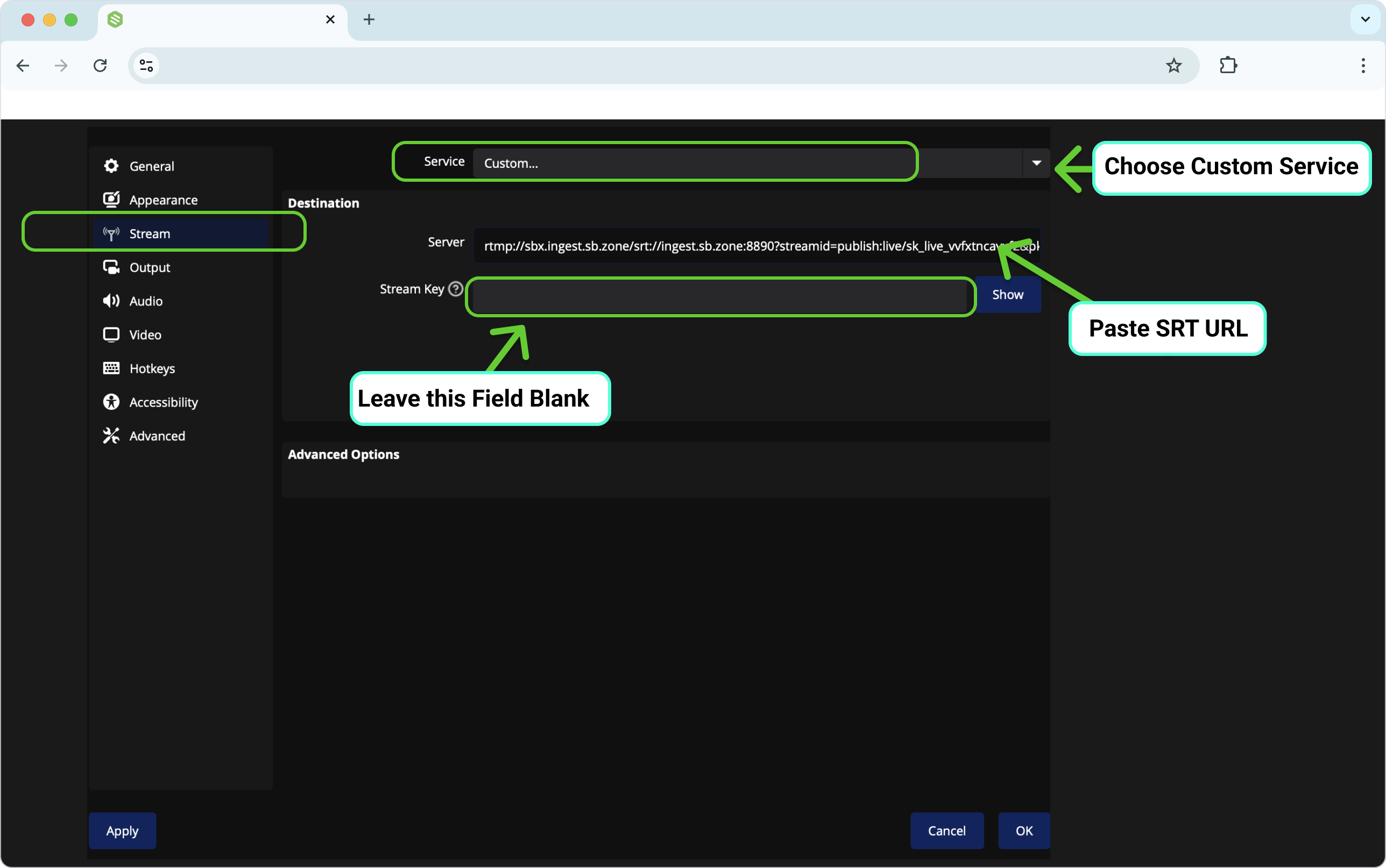
Open OBS Studio and click Settings in the bottom right corner.
Choose Stream from the left-side menu.
Click the Service drop-down menu and select Custom.
Paste the SRT link you copied from Switchboard directly into the Server field in OBS.
⚠️ Crucial Step: Leave the Stream Key field completely blank! (Unlike RTMP, Switchboard's SRT URL automatically contains the stream ID routing information, so a separate stream key is not needed.
Click Apply and OK.
Phase 4: Go Live!
In OBS, press Start Streaming.
Toggle back to your Switchboard Live dashboard. Within a few seconds, your rock-solid SRT video feed will appear in the Switchboard preview window.
You are now ready to push your broadcast to the world! Click the green Start button next to your desired destinations, or press the button at the top of your Stream Group to go live everywhere at once.
The Benefits of Using SRT (Choosing Your Protocol)
As you set up your encoder, you may wonder whether to send your video to Switchboard using traditional RTMP or the new SRT input. Both reach Switchboard the same way. The difference is how they behave when your connection isn't perfect.
Here is why you should consider using SRT for your workflow:
1. Built for Rough Networks (Remote & Cellular)
SRT was designed specifically for field broadcasts, outdoor events, and uplinks you can't fully trust, where cellular modems and public Wi-Fi can be unreliable.
Real-Time Packet Recovery: It can maintain a stable, high-quality stream even on networks experiencing significant packet loss, conditions that would cause traditional protocols to fail entirely.
Intelligent Error Recovery & Security: Unlike RTMP (which has to resend entire data sequences if something goes wrong), SRT identifies individual lost packets and retransmits only the missing pieces, while encrypting your feed end-to-end for maximum security.
2. Ultra-Low, Configurable Latency
SRT provides much lower end-to-end delay than traditional protocols.
Superior Speed: Because of its unique architecture, SRT delivers significantly lower end-to-end latency than standard RTMP workflows, making it the better choice for time-sensitive broadcasts.
No Stream Stalling: It does not stop your entire broadcast to wait for a single lost packet (a major bottleneck for older protocols). Furthermore, you can manually configure your latency buffer to find the perfect balance between the lowest possible delay and maximum protection against network errors.
3. High Throughput Stability over Long Distances
SRT significantly outperforms RTMP when sending video globally or across the country.
Overcoming Distance Bottlenecks: Older protocols lose bandwidth capacity as physical distance increases (often failing at higher bitrates). SRT’s architecture maximizes your available network link regardless of geographic distance.
Maintains High Quality: Whether you are sending a feed across the city or across the world, SRT can easily maintain massive bitrates (like 20 Mbps streams), ensuring your high-quality or 4K video reaches its Destination reliably.
When should you just stick to RTMP?
RTMP is the reliable standard (wired & stable). It works with virtually every encoder right out of the box. It is best when you have a steady bandwidth, such as a hardwired Ethernet connection in an office, a broadcast studio, or a council chamber.
💡 Not sure which one to pick? Start with RTMP, you can switch anytime! It is the easiest to set up, and your team can seamlessly transition to SRT whenever a remote, on-location broadcast requires it.